
1. Introduction
An uncomfortable question: do you know how much you spend on paid AI every month?
Add up the chat subscription, the API calls, that service you tried and now auto-renews... When you actually do the math, many people get a scare. And the trend points up: APIs are not getting cheaper, and we keep putting AI into more things.
Here is the idea behind this whole site: for a big chunk of what we use AI for daily, we do not need to pay anything. Summarizing, drafting an email, rewriting, classifying, brainstorming, helping with code... all of that can run on your own machine, for free, with no token limit and without your data leaving your computer.
And no, this is not the clunky stuff from two years ago. In 2026 we have open models like Qwen 3, Gemma 4 or Llama 4 that handle your day-to-day on a laptop without breaking a sweat: instant answers, no queue, no token counter ticking.
In this article we build a private, local ChatGPT in a single afternoon, with a proper interface, wired to your code and combined with paid AI only when it is really needed.
Let's get to it!
2. Requirements
Very little: a normal machine (8 GB of RAM to start, 16 GB is plenty for daily use), Windows, Mac or Linux (Ollama runs on all three), 20 minutes to download the first model, and the will to stop staring at a token counter. No 2,000 € GPU, no account anywhere, no credit card. Everything runs at home.
3. What we are building
- Ollama: the engine that downloads and runs the models.
- An open model (Qwen 3, for example): the brain.
- Open WebUI: a ChatGPT-like chat interface in your browser, 100% local.
- The local API: to plug AI into your scripts.
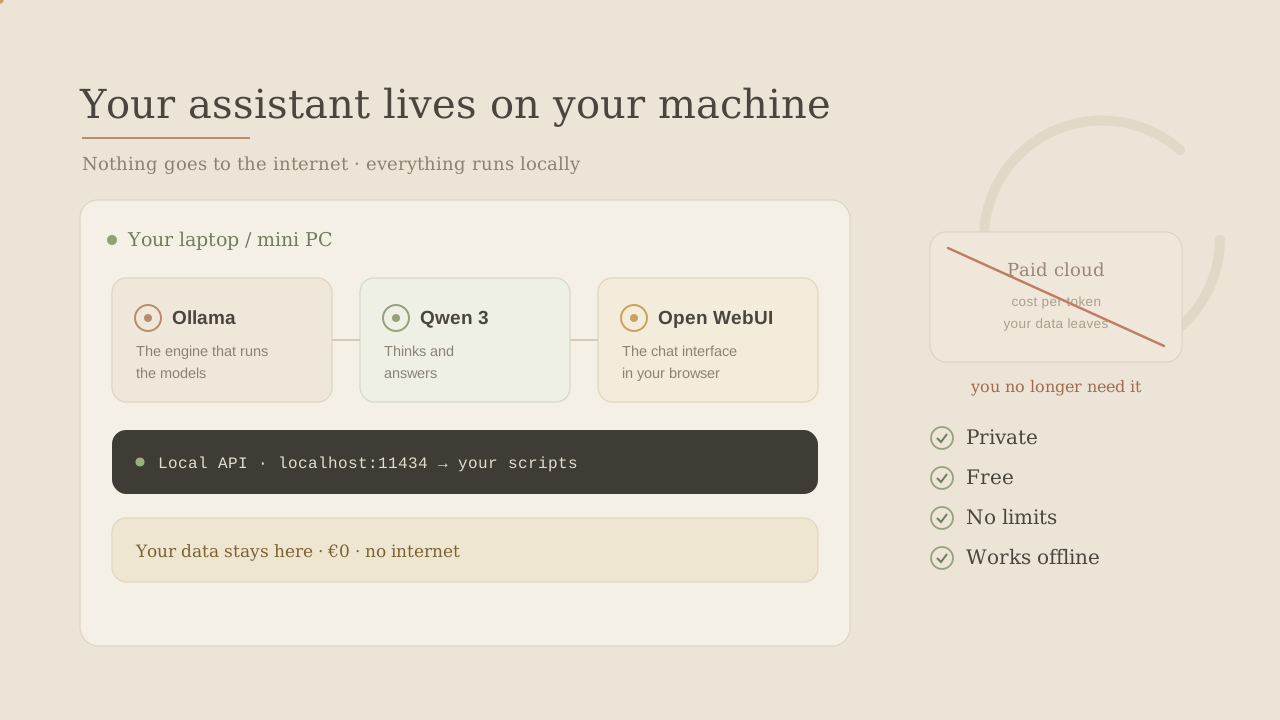
Notice the key detail: no arrow leaves to the internet. Your prompt goes in, the model processes it on your machine, the answer comes out. That's it: zero cost per token, zero data traveling around.
4. Step 1: install Ollama
Ollama makes all of this easy: it downloads the model, uses your GPU if you have one and serves a local API without you touching anything weird.
- Download the installer from the official Ollama docs.
- Install it like any other program.
- Open a terminal.
- Launch your first model:
ollama run qwen3:8b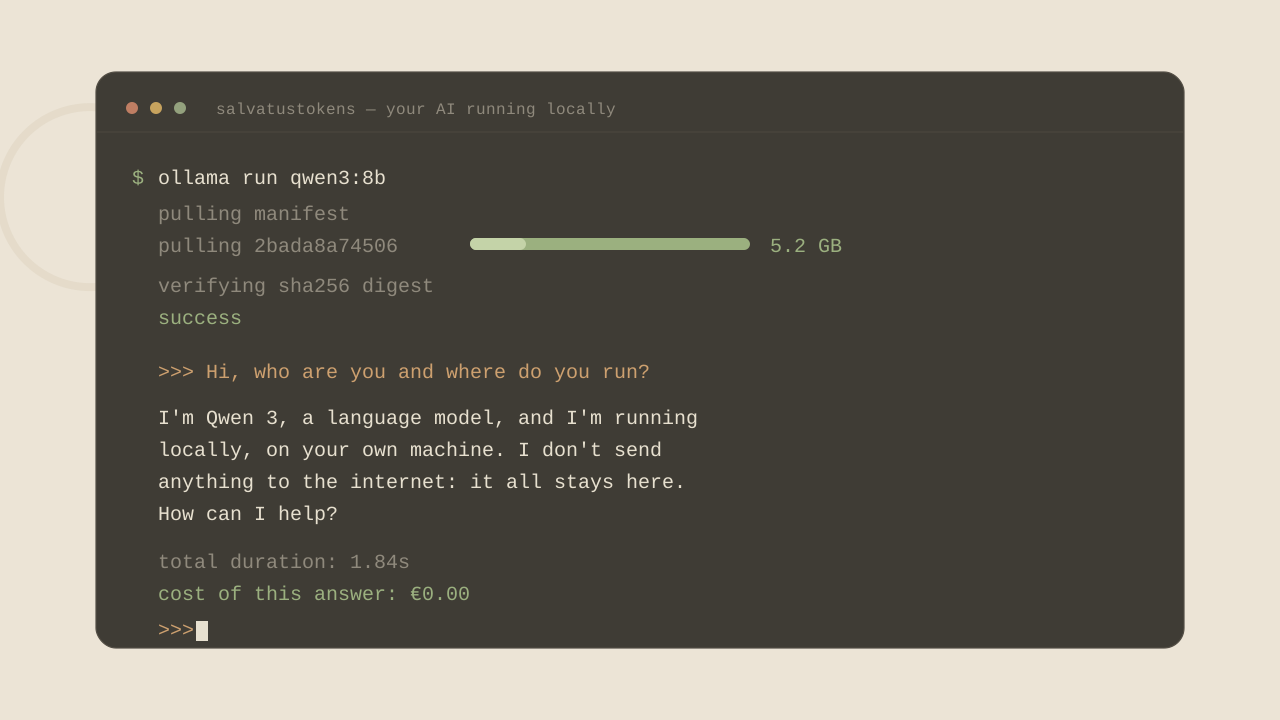
That's it. What you're seeing is an AI model running on your machine, answering without sending anything to the internet and without charging you a cent.
ollama list           # see your models
ollama pull gemma3:4b # download another one
ollama rm qwen3:8b    # delete one to free space
5. Step 2: choose your model by RAM
The million-dollar question: which model do I download? Honest answer: the one that fits comfortably in your RAM, not the one with the best reputation. A huge model that stutters is useless; a mid one that flies wins.
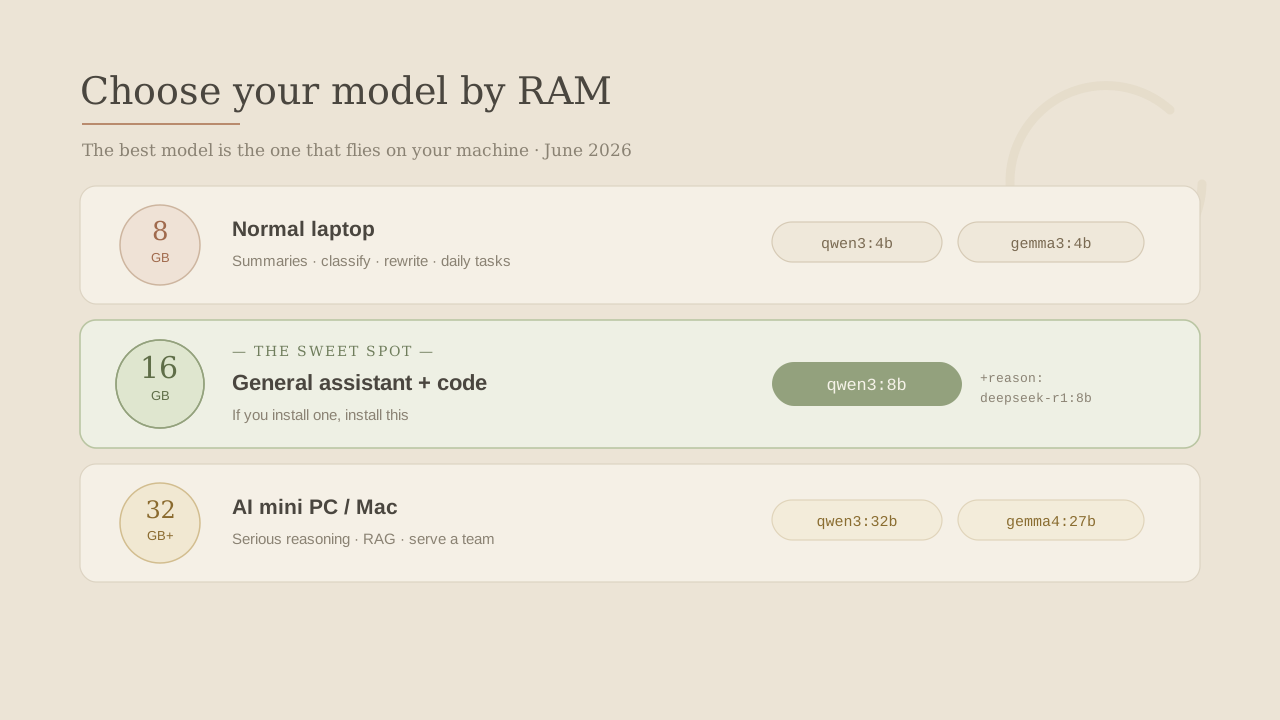
- 8 GB: 3B-4B models like
qwen3:4b,gemma3:4borllama3.2:3b. Plenty for summaries, classification, rewriting. - 16 GB (sweet spot):
qwen3:8band done. The perfect balance of smart and light, and good at code too. If you install one model, install this. Need more reasoning? Trydeepseek-r1:8b. - 32 GB+:
qwen3:32b,gemma4:27borllama4-scout. Team-serving, serious RAG territory.
Don't fall in love with the model name. Download two, run your real tasks through them and keep the one that flies on YOUR machine. The best local AI is the one that doesn't make you wait.
6. Step 3: your private ChatGPT with Open WebUI
The terminal is fine for testing, but we want something that feels like ChatGPT. That's Open WebUI: a chat interface that connects to Ollama with conversation history, multiple models and file uploads, all in your browser.
With Ollama running, the easiest path is Docker:
docker run -d -p 3000:8080 \
  --add-host=host.docker.internal:host-gateway \
  -v open-webui:/app/backend/data \
  --name open-webui \
  ghcr.io/open-webui/open-webui:main
Then open http://localhost:3000, create your local user, pick qwen3:8b and start chatting.
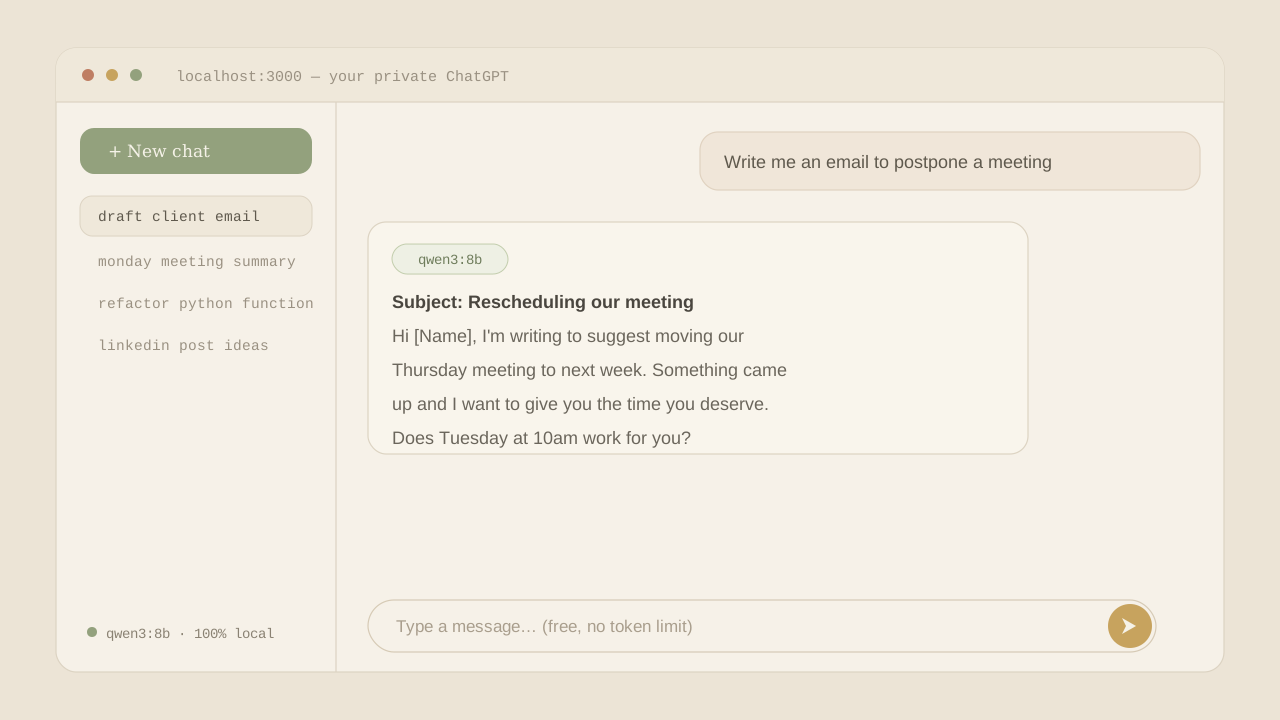
Same look, same comfort, but no subscription, no message limit and nothing leaving your machine. For non-technical teammates this is gold: they use "the company ChatGPT" without any sensitive data leaving the office.
7. Step 4: connect it to your code
Ollama serves a local API at http://localhost:11434, and it is OpenAI-compatible. That means you can reuse the same code you already use for paid AI, changing just two lines.
pip install openaifrom openai import OpenAI
client = OpenAI(
base_url="http://localhost:11434/v1",
api_key="ollama", # anything works, it's local
)
response = client.chat.completions.create(
model="qwen3:8b",
messages=[
{"role": "system", "content": "You are a clear, direct assistant."},
{"role": "user", "content": "Summarize this email in 3 bullets: ..."},
],
)
print(response.choices[0].message.content)That script works, sends nothing to the internet and costs nothing no matter how many times you run it. For an automation processing hundreds of texts a day, what used to be an invoice is now free.
8. Step 5: the hybrid approach (local + paid)
The honest part: local AI does not replace everything. An 8B model on your laptop does not reason like the latest giant paid model. And that's fine.
The smart move is hybrid: mechanical and repetitive work → local (free and private); hard, ambiguous or critical work → paid (pay for real intelligence).
If a mistake is caught fast and fixed easily, go local. If a mistake costs money, reputation or security, pay for quality.
def choose_model(task):
    if task["risk"] == "high":
        return "paid"
    if task["type"] in {"summary", "classification", "rewrite", "extraction"}:
        return "local"
    if task["tokens"] > 8000:
        return "local"
    return "paid"
About 80% of daily queries fall into "local" and are solved for free. Only the hard 20% reaches the paid model. That's where the real saving is.
9. How much do you really save?
Think of someone using AI intensively: premium subscriptions, API calls in automations... easily around 200 € a month. Per year:
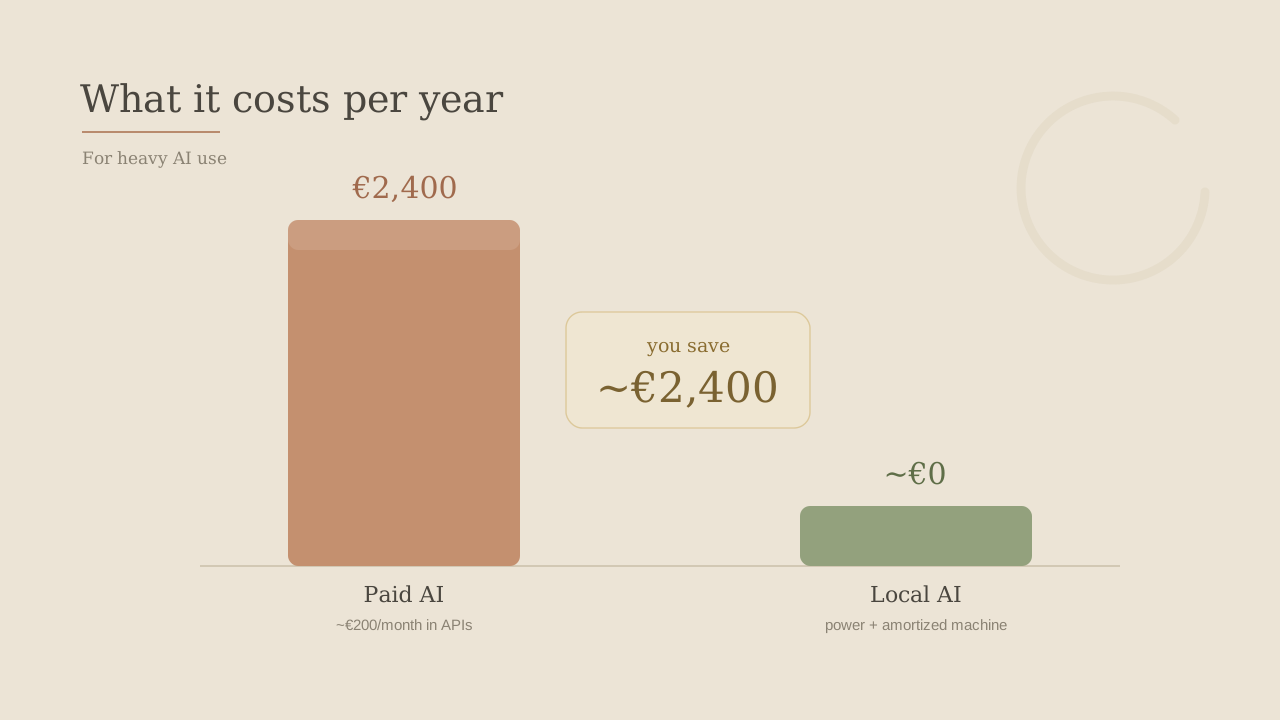
Paid AI (intensive use):   ~200 €/month  ->  ~2,400 €/year
Local AI:                  power + already-amortized machine  ->  ~0 €
Not magic: the machine and the electricity cost money. But if you already have a decent laptop, moving a big chunk of your tasks to local costs almost nothing extra, and the saving compounds every month.
There's a second saving that never shows on the invoice: privacy. Your contracts, client data and code never leave your machine. With the EU AI Act tightening on high-risk systems from August 2026, for sectors like legal, health or banking this stops being a nice extra and becomes a requirement.
Three columns to track: cost (drops to near zero), privacy (your data stays home) and quality (plenty for daily work; escalate the hard stuff to paid). The best of both worlds.
10. Extras
- Give it personality with a
Modelfile(fixed system prompt + temperature), thenollama create mi-asistente -f Modelfile. - It also reads images: models like
gemma3:4baccept screenshots to summarize or extract text, all local. - Measure with your tasks, not benchmarks: 20 real examples beat any ranking.
- Keep it running: Ollama can stay in the background so your assistant is always ready, and it still works offline.
11. Full setup
- Ollama installed.
- A model that fits your RAM (
qwen3:8bif you have 16 GB and want just one). - Open WebUI for your private ChatGPT in the browser.
- The local API wired to your scripts in two lines.
- A hybrid router sending easy tasks local and hard ones to paid.
- Monthly measurement of cost, privacy and quality.
You get an AI that is truly yours: fast, private, no token counter, built in one afternoon. Not giving up paid AI, just not paying for what doesn't need it.
That, in the end, is the idea behind this whole site: let AI work for you without emptying your wallet.