
1. Introduction
In the previous article, An offline NotebookLM on a Cheap Intel, we built a private "second brain" from scratch: a minimal NotebookLM clone that reads your documents and answers 100% offline on a low-power, low-consumption machine (a silent little mini-PC is plenty), sending nothing to the cloud and paying for zero tokens.
We left it working, but deliberately bare-bones, and promised a few improvements. This article is exactly that: we take the same code and add the extras we had pending. We don't touch the brain (the RAG is unchanged); we just make it nicer to use.
As always, we'll explain the code line by line and lean on an everyday comparison, so newcomers can follow too. Let's go!
2. A reminder of where we left off
The one-sentence recap: we use LangChain to orchestrate, OpenVINO to run the models fast on the CPU, FAISS as an on-disk vector database, a multilingual embeddings model to search, and a small SLM quantized to INT4 to write the answer as a stream.
The metaphor still holds: the language model is a brilliant writer with a tiny desk (the context window), so we sit a librarian next to it that chops your documents, files them by meaning and hands the writer only the few relevant passages per question.
None of that changes. What changes is the interface: today we add three conveniences.
3. The three extras at a glance
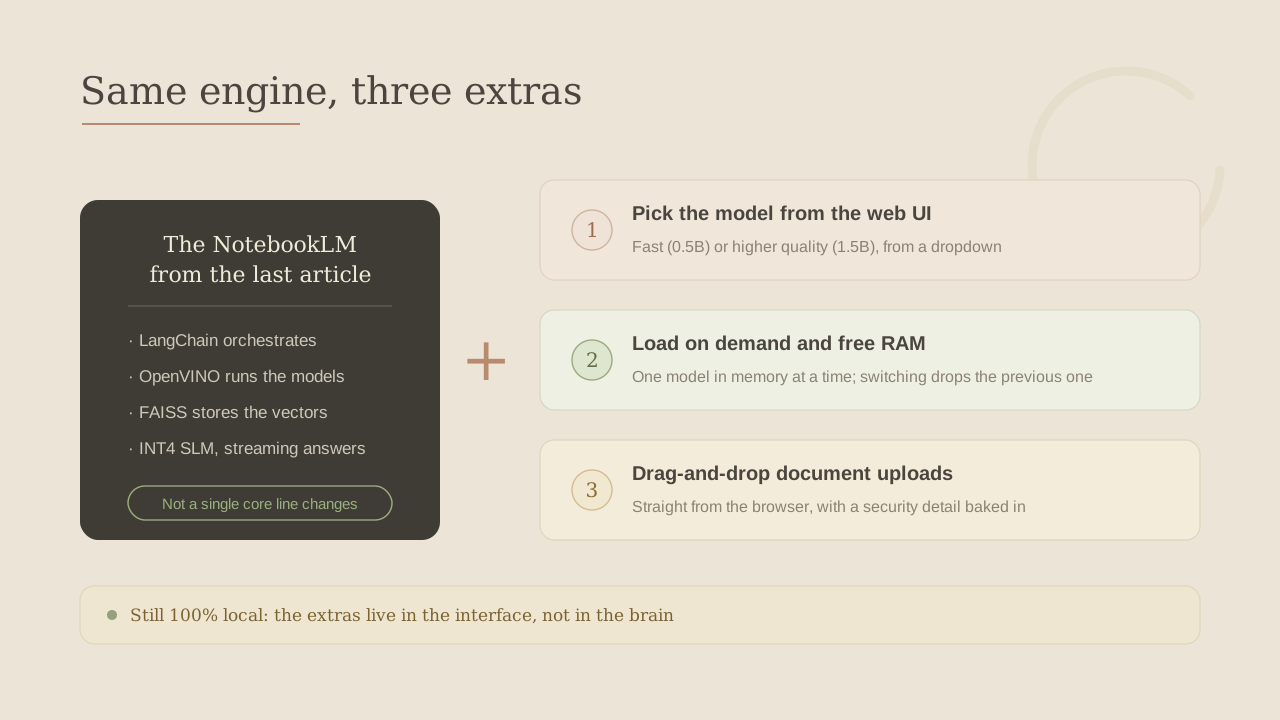
Three pieces, and the key point is that none touches the core:
- Pick the model from the web. A sidebar dropdown to switch between a fast model (0.5B) and a higher-quality one (1.5B), without editing any file.
- Load on demand and free the RAM. On a low-power machine memory is gold, so we keep one model loaded at a time: switching models drops the previous one before loading the new one.
- Drag-and-drop uploads. Add files from the browser instead of copying them into a folder by hand. And, since we're touching uploads, we do it with a small security care.
Let's take them one by one.
4. Extra 1: pick the model from the web
In the first version, changing model meant editing config.py by hand. Now we want to choose it from the web. First we declare which models are available:
def llm_dir(model_id: str) -> Path:
    """Folder where a given model is exported (one per model)."""
    return MODELS_DIR / f"llm-{model_id.split('/')[-1].lower()}-int4"


#Models selectable from the web (label -> HuggingFace id)
AVAILABLE_LLMS = {
    "Qwen2.5-0.5B · fast": "Qwen/Qwen2.5-0.5B-Instruct",
    "Qwen2.5-1.5B · quality": "Qwen/Qwen2.5-1.5B-Instruct",
}
Two simple but key things:
AVAILABLE_LLMSmaps a nice label (what the user sees in the dropdown) to the real model id. Adding a third model is one more line here.llm_dir()decides which folder each model lives in, derived from its id. So the 0.5B and 1.5B end up in separate folders and coexist without clashing.
Before, there was a single fixed LLM_OV_DIR. Now each model has its own folder, which is what lets us keep both downloaded and hop between them.
On the web, this becomes a sidebar dropdown:
st.header("Model")
labels = list(config.AVAILABLE_LLMS)
default_label = next(
    (l for l, i in config.AVAILABLE_LLMS.items() if i == config.LLM_MODEL_ID),
    labels[0],
)
choice = st.selectbox("Language model", labels, index=labels.index(default_label))
selected_id = config.AVAILABLE_LLMS[choice]
selected_dir = config.llm_dir(selected_id)
labels are the dropdown options, default_label makes it start on the config default, and from the chosen label we get the real id and, via llm_dir(), the folder where that model is exported. Three lines and the user can choose. But here a very low-power problem appears: if the user jumps from the small model to the big one, won't we end up with both in memory at once? On a machine with little RAM that's exactly what we don't want. Time for a comparison.
5. The single-oven bakery
Picture a small bakery with a single oven. That oven is your machine's RAM: it has room to bake one loaf at a time, no more.
You choose which loaf to bake:
- A fast baguette (our 0.5B model): ready in no time, perfect for one-off questions. It flies even on very modest hardware.
- A sourdough (the 1.5B model): slower and takes more oven, but comes out with more body and nuance.
The golden rule is the oven's: only one loaf fits inside. To bake the sourdough while the baguette is in there, you can't fit both: you take the baguette out first, then put the sourdough in. Force both in and the oven (the RAM) can't cope, and the whole thing collapses.
"Loading a model" is exactly that: putting a loaf in the oven. It takes time and room. But before we program that emptying, it's worth answering the question hanging in the air: is the slower loaf really worth it? That is, what do we actually gain with the big model?
6. What do we gain with the 1.5B model?
A fair question: if the 0.5B already works, what does the 1.5B add? Does it understand images? Does it do OCR? Let's be concrete, because it's easy to expect magic that isn't there.
First, the honest part: the 1.5B model is still a text-only model. It doesn't see images, doesn't read photos or scans and does no OCR. A bigger model doesn't "see" more; it simply reasons and writes better over the text it already receives. Reading images or scans is another league (it would need a vision model or an OCR step), and that's exactly what we leave for "what's cooking next".
So what do we gain for our job —chatting with documents—? Very concrete things:
- Better synthesis when the answer is scattered. If your question forces it to stitch together three or four different chunks, the 1.5B weaves them into a coherent answer far better than the small one.
- It handles complex or ambiguous questions better. Nuance, double conditions, "compare A with B"… where the 0.5B falls short, the 1.5B usually nails it.
- It follows instructions better. It respects "answer only from the context", the word budget and the requested format more reliably.
- Richer summaries, fewer loops. Tiny models tend to repeat themselves or stay shallow; the 1.5B writes more finely.
- Better across languages. Spanish (and others) come out more naturally.
And a key caveat we already saw last time: the bigger model doesn't find better chunks. Which parts of your documents get retrieved depends on the embeddings model (the librarian), which doesn't change here. The 1.5B improves how the answer is written and reasoned, not what is found. So if it misses a fact, the problem isn't the brain's size but the search.
In short: switch to the 1.5B when you want rounder, more reasoned answers (long summaries, questions crossing several sources); stick with the 0.5B for quick everyday questions. What neither of them does —yet— is read images. So let's get back to the oven: let's see how, when you switch loaves, the code empties it first.
7. Extra 2: load on demand and free the RAM
First, in core.py, we make our model class able to load any folder, not just the default one:
class ChatLLM:
    def __init__(self, model_dir=None):
        from optimum.intel import OVModelForCausalLM
        from transformers import AutoTokenizer

        model_dir = str(model_dir or config.LLM_OV_DIR)
        self.tokenizer = AutoTokenizer.from_pretrained(model_dir)
        ...


def llm_is_ready(model_dir) -> bool:
    """True if that model has been exported to OpenVINO."""
    return (Path(model_dir) / "openvino_model.xml").exists()
Small but enabling: before, the model always loaded from a fixed path; now we pass model_dir and it loads whichever we ask. And llm_is_ready() is a one-line check: does openvino_model.xml exist in that folder? If it does, that loaf can be baked; if not, we haven't prepared it yet (see section 12).
The interesting part is on the web. Streamlit re-runs the whole script on every interaction, so we cache the loaded model to avoid re-baking it on each question:
#max_entries=1: keep only the model currently in use cached (frees RAM)
@st.cache_resource(max_entries=1, show_spinner="Loading the language model (OpenVINO)...")
def get_llm(model_dir: str):
    return core.get_llm(model_dir)


def load_llm(model_dir: str):
    """Load the selected model, freeing the previous one from RAM on a switch."""
    import gc

    if st.session_state.get("model_dir") != model_dir:
        get_llm.clear()      # drop the previously loaded model...
        gc.collect()         # ...and release its memory before loading the new one
        st.session_state["model_dir"] = model_dir
    return get_llm(model_dir)
This is the "single oven" turned into code:
@st.cache_resourcekeeps the oven hot: once loaded, Streamlit reuses the model on every question instead of reloading it from scratch (which is slow).max_entries=1is the oven rule: the cache holds at most one model. We don't collect models in memory.- In
load_llm(), we compare the model the user wants with the one we already had (st.session_state). If it's the same, we do nothing: the oven already has the right loaf. - If it changed,
get_llm.clear()drops the previous model from the cache andgc.collect()tells Python to reclaim that memory now, before loading the new one. That's taking the baguette out before putting the sourdough in.
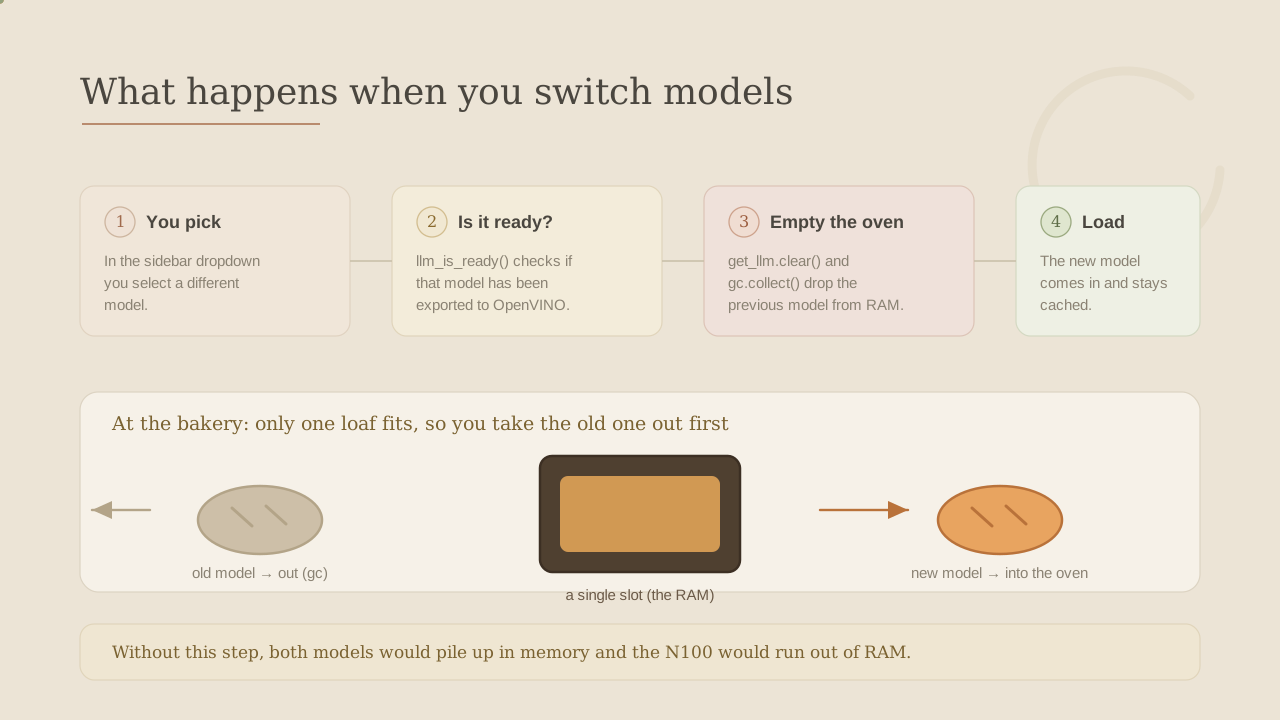
Why so much care over such a small detail? Because without that clear() + gc.collect(), switching models would leave both in RAM for a while, and on a machine with little memory that's the difference between working and running out of memory. Order matters: empty first, then fill.
8. Extra 3: drag-and-drop uploads
In the first version, adding a document meant copying it into the documents/ folder by hand and then re-indexing. Fine for a hacker, less so for everyone else. Now we upload it from the browser:
def save_uploads(files) -> int:
    """Save uploaded files into the documents folder. Returns how many."""
    config.DOCUMENTS_DIR.mkdir(parents=True, exist_ok=True)
    for f in files:
        #Path(...).name strips any directory components (no path traversal)
        (config.DOCUMENTS_DIR / Path(f.name).name).write_bytes(f.getbuffer())
    return len(files)
And in the sidebar, the classic "drop your files here" box:
uploaded = st.file_uploader(
    "Upload documents",
    type=["txt", "md", "pdf"],
    accept_multiple_files=True,
)
if uploaded and st.button("➕ Add & index", use_container_width=True):
    n = save_uploads(uploaded)
    st.sidebar.success(f"Saved {n} file(s)")
    reindex()
st.file_uploader(...) creates the upload box (only .txt, .md, .pdf, multiple files allowed). When there are files and the user clicks Add & index, save_uploads() writes them into documents/ and reindex() indexes them incrementally (same logic as the previous article: only the new stuff is processed).
Note we don't duplicate logic: uploading is just "drop the file in the folder and re-index". The RAG never notices the document arrived by drag-and-drop instead of by hand. But one line of save_uploads() deserves its own section.
9. The front-desk clerk: a security detail
Look at this line again:
(config.DOCUMENTS_DIR / Path(f.name).name).write_bytes(f.getbuffer())The detail is Path(f.name).name. An uploaded file's name is chosen by whoever uploads it, not by us. A name can be perfectly normal (notes.pdf) or it can carry a trap, like ../../something/important. Those ../../ mean "go up two folders and write there", outside documents/. If we saved the file as-is, someone could use that "address" to write where they shouldn't. The trick has a name: path traversal.
The comparison: uploading a file is like handing a parcel to a front desk. The parcel has a name, but it may also carry a "delivery address". Our clerk has a simple rule: keep only the parcel's name and bin the address. Whatever it says, the parcel is left on our shelf (documents/) and nowhere else.
That's exactly what Path(f.name).name does: from ../../something/important it keeps only important, dropping the whole path part. A tiny call that closes a classic hole. When you accept files from outside, never trust their name as-is: keep only the last part.
10. Exporting several models at once
To pick between two models on the web, you first need both downloaded. So the download script now accepts several models at once:
def main(argv: list[str]) -> int:
    #Models to export: the ids passed as arguments, or the config default.
    #Example: python download_models.py "Qwen/Qwen2.5-1.5B-Instruct"
    llm_ids = argv[1:] or [config.LLM_MODEL_ID]
    for model_id in llm_ids:
        export(
            model_id,
            config.llm_dir(model_id),
            ["--weight-format", "int4", "--group-size", "128",
             "--ratio", "1.0", "--task", "text-generation-with-past"],
        )
    ...
Step by step: llm_ids = argv[1:] or [config.LLM_MODEL_ID] exports the ids you pass on the command line, or the config default if you pass none; the for loop quantizes each one to INT4 in its folder (via llm_dir(), the same function from section 4).
To have both models ready and switchable on the web, one command does it:
python download_models.py "Qwen/Qwen2.5-0.5B-Instruct" "Qwen/Qwen2.5-1.5B-Instruct"Remember from the previous article: quantizing (packing the INT4 "carry-on") is the only step that needs internet and a fair bit of RAM temporarily. Once done, unplug the network for good.
11. A quick aside: what is a guardrail?
Before the next trick, let's explain a word you hear a lot in AI: guardrail (a "safety barrier").

Think of the bumpers in a bowling lane for kids: they rise up over the gutters so the ball can't fall in. Those bumpers don't bowl for you or pick which pins to aim at; they simply prevent the worst outcome. A guardrail is exactly that in software: a simple rule that doesn't do the work, but stops things from going down the drain.
We already met one last time without naming it: the prompt that forces the model to answer only from the context and to always finish its sentences is a guardrail. It doesn't improve the answer, but it prevents the worst case (making things up or cutting off mid-sentence).
Guardrails are cheap and rewarding: a couple of lines that turn a fragile program (one that breaks at the first surprise) into a robust one (that fails gracefully and tells you what to do). The next one is exactly that kind.
12. A guardrail in practice: warn if the model isn't there
What if the user picks a model they haven't downloaded yet? Instead of crashing with an ugly error, the web detects it and tells them exactly what to do, using the llm_is_ready() from section 7:
if not core.llm_is_ready(selected_dir):
    st.warning(
        f"**{choice}** is not downloaded yet. Export it once with:\n\n"
        f"```\npython download_models.py \"{selected_id}\"\n```"
    )
    st.stop()
llm_is_ready(selected_dir) checks whether that model was exported (whether its openvino_model.xml exists). If it isn't there, we show a warning with the exact command and st.stop() halts the page right there, without trying to load a model that doesn't exist. It's the bowling bumper in action: instead of letting the ball fall in the gutter (the app "blows up"), we stop it and tell you how to carry on.
13. How the interface looks
Putting the three extras together, the sidebar gains its upload box, its index button and its model dropdown, while the chat stays just as simple:
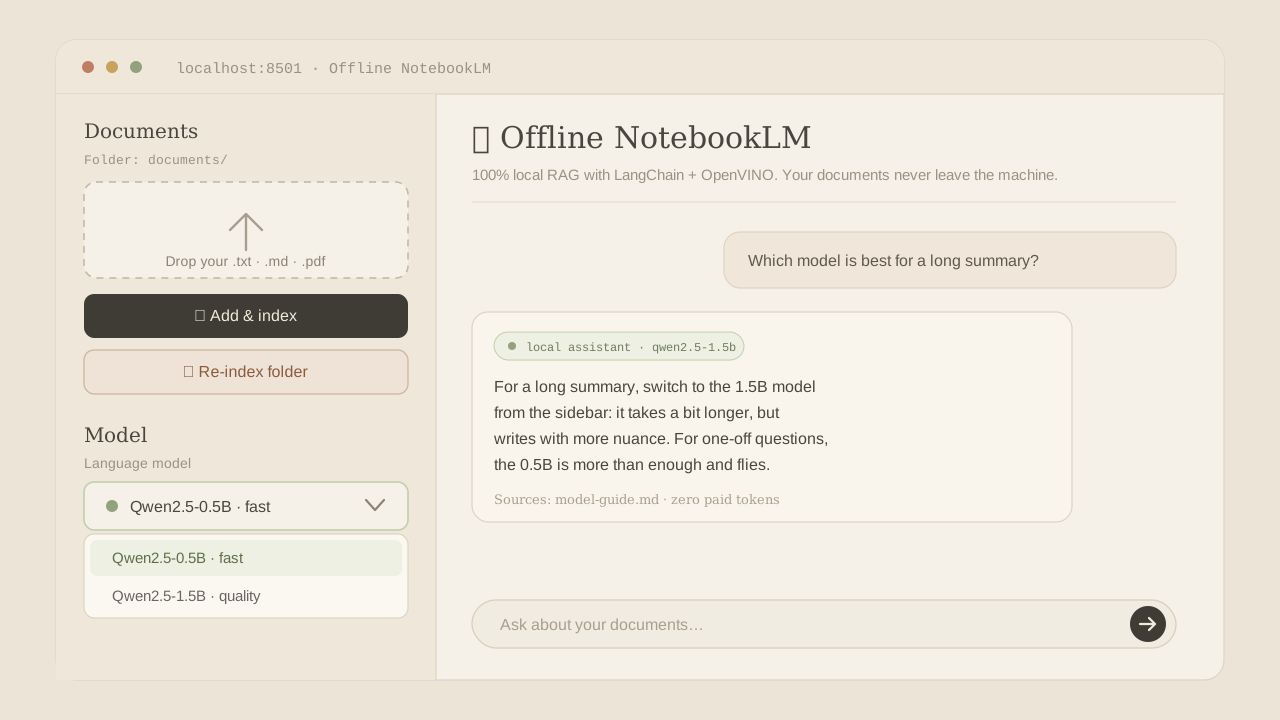
The nice design bit is what you don't see: all this convenience was built without touching the RAG. The read-chunk-embed-search-answer logic is the same as the previous article. The extras live in the interface, in config.py and in four functions of app_web.py. The brain never noticed.
14. What's cooking next
That closes the two big promises from the first part (model picking and drag-and-drop). What's left on the list is, precisely, what a text model can't do on its own:
- OCR for scanned PDFs and screenshots. Right now images come in empty (text only). A light OCR step at ingestion (e.g. RapidOCR on OpenVINO) would read the text trapped in images.
- Captioning charts with a tiny vision model. Briefly spin up a micro-VLM to put a chart into words, store that description in the index, and go back to a fast text-only system.
- More speed. A go at the machine's integrated GPU and speculative decoding.
15. I want the code!
This part's recipe, in six steps:
- Export the models you want to offer (once, with internet):
python download_models.py "Qwen/Qwen2.5-0.5B-Instruct" "Qwen/Qwen2.5-1.5B-Instruct". - Open the web with
streamlit run app_web.py. - Drag your documents into the upload box and click Add & index.
- Pick the model in the dropdown: fast (0.5B) for everyday use, quality (1.5B) for richer answers.
- Chat. Switching models frees the previous one from RAM on its own.
- Unplug the network and keep enjoying a private, very low-power NotebookLM, now nicer to use.
No new magic: the same small model + INT4 + OpenVINO as ever, with three conveniences that live in the interface. Grab the code, drop in your documents and keep chatting with your second brain.
The code for this extras version will be published alongside the previous one, sttokens_mynotebookslm.